
Ikibox — the iris photography booth
Sell iris photos without being a photographer.
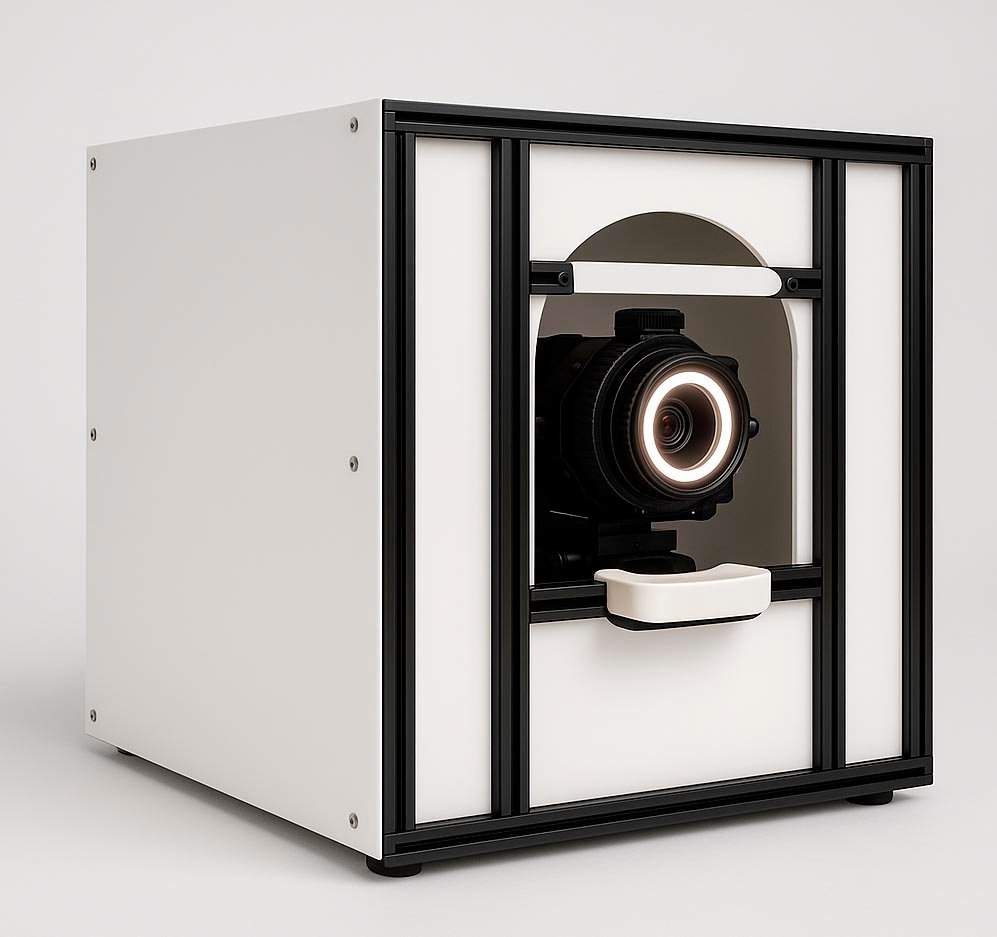
Your customer sits down, you choose the eye, and the booth does the rest: it frames, takes the photo, tells you whether it came out right and sends it to the customer’s folder. Two minutes, two eyes, nothing to adjust.
No photography skills
Ready to use from day one
Photo checked on the spot
Automatic filing
Consistent results every time
The essentials
What the booth does for you
Photographing an iris is hard: the eye is tiny, it moves, it blinks, and the slightest imprecision makes the image unusable. That is exactly what Ikibox takes off your hands.
It finds the eye
The booth locates your customer’s face, tells the left eye from the right, and moves into position in front of the one you chose. You adjust nothing.
It takes the photo
Framing, focus, shutter release: everything is handled. If the result isn’t right, the booth tries again by itself, without you having to step in.
It waits for the right moment
A customer who blinks or moves won’t ruin the session: the photo is only taken when the eye is open and properly framed.
It gives everyone the same light
Lighting is built in and controlled by the machine. You get the same result at every session, whatever the lighting in your store and the time of day.
It rates the photo
Two indicators, in green, orange or red, tell you straight away whether the photo is good. You know whether to retake it before the customer gets up.
It files everything
The photo goes automatically to the customer’s online folder, under the right name, with a backup copy. Nothing to rename, nothing to sort, nothing to forget.
A session
How an in-store photo session works
01
You look up your customer
Type the first letters of their name and their record appears. If they have just been created on your website, a single button opens the booth ready for them.
02
They sit down at the booth
No position to hold to the millimetre, no settings to change for each person. The booth adapts to the height and build of whoever is seated.
03
You press “Right eye”
Two large buttons on the screen, one for each eye. It is the only decision you make during the whole session.
04
The booth gets to work
About ten seconds during which you have nothing to do, and your customer can see something serious is happening.
05
The photo appears full screen
Your customer sees their iris on screen, in large format. This is the moment that triggers the sale of the print. You glance at the two quality indicators.
06
You move on to the next eye
While the approved photo is sent to the customer’s folder, you move on to the second eye or back to selling. The booth finishes the job on its own.
Audience
Who Ikibox was designed for
Opticians looking for a new service
Iris photos sell well and stand out in a shop window. With Ikibox, they need no studio, no photographer and no technical skills: just a corner of your store and a member of staff trained in a single demonstration.
Retailers who want to draw people in
A visible booth attracts attention, and the session itself is a show. Customers leave with a unique image of themselves, and often with the perfect gift for someone else.
Established iris photographers
The time spent framing and retaking failed photos goes back into selling. No more unpleasant surprises discovered in the evening on the retouching screen, long after the customer has left.
Chains and franchises
Each booth works under its own store’s name and files its photos the same way. Quality no longer depends on the skill of whoever is on shift that day.
Benefits
What the booth changes for you
Anyone can operate it
Two buttons and a session that runs itself. Training a new member of staff doesn’t mean teaching them photography.
Fewer sessions to redo
Quality is checked while the customer is still seated. A retake costs a minute, not a second appointment.
Consistent results
The same process from Monday to Saturday, whoever is at the controls. Your prints look consistent.
More time for selling
While the booth finishes its work, you are already presenting print sizes and frames.
No lost photos
Automatic naming, upload and backup. No more files forgotten somewhere or saved in the wrong place.
A window-display selling point
A machine that photographs eyes is something people talk about. Your customers tell others, and it shows in your footfall.
Peace of mind
What you don’t have to worry about
Getting started
The booth arrives ready. It is calibrated once and for all during installation: you have no settings to learn or maintain.
Day-to-day settings
They are password-protected. Your staff only see the capture screen and cannot change anything by accident.
Files
Upload, naming, backup and clean-up are automatic. You never handle a photo manually.
Troubleshooting
The booth keeps a log of its operation: most issues can be diagnosed over the phone, without taking your booth out of service.
Part two
Everything the booth can do
The complete list of features, as you will come across them in use.
01
Capture
Booth
- One button per eye: the session then runs by itself
- The booth tells you where it is at every step
- It tries again by itself if the photo isn’t right
- It won’t take a shot of a closed or badly framed eye
- You can stop everything at any time with a single tap
- An assisted mode, where you take the shot yourself at the right moment
- A fully manual mode for special cases
- Clear messages when something goes wrong, and what to do
02
Framing
Booth
- Automatic detection of both eyes of the seated person
- Choice of left or right eye, with no risk of mix-ups
- The booth moves into position in front of the chosen eye by itself
- Adapts to each person’s height and build
- Tracks the customer’s small movements during framing
- Automatic focus, checked before every shot
- Live image on screen, so you see what the booth sees
03
Quality control
Booth
- Every photo is rated automatically as soon as it appears
- A sharpness indicator
- An indicator of how much of the iris is clearly visible, eyelids included
- Colour gauges from red to green, readable at a glance
- The photo appears immediately, with the ratings added right after
- Quality threshold adjustable at installation, to suit your prints
04
The customer and their session
Booth
- Find a customer by typing the first letters of their last name, first name or email
- Their record appears instantly, without switching windows
- Option to enter the first name associated with the photo
- Opens your sales website from the booth, on the current customer
- From your website, one button opens the booth ready for that customer
- Capture still works even if the internet is down
05
Photos and filing
Booth
- Automatic upload of the photo to the customer’s online folder
- File name built automatically: store, customer, first name, date
- Backup copy in your cloud folder
- Automatic clean-up of local copies after the delay you choose
- Uploads run in the background: you never wait at the machine
- Every photo is kept in full quality for printing
06
Everyday use
Booth
- Everything is touch-controlled: large buttons, large text
- Large-format photo display, to show the customer
- Interface in French
- A shortcut that opens capture directly
- Password-protected settings: your staff can’t change anything
- The application can’t be launched twice by accident
07
Setup and monitoring
Booth
- Activation with a simple code, then valid for one year
- Machine calibration done once, at installation
- Full operational check in a few minutes
- Your settings are saved and reloaded at every startup
- Operation logging for remote troubleshooting by phone
- Version number displayed, so you know what is installed
08
Print preparation
Retouching workstation
- Drop the photo onto the window and processing starts
- The iris is cut out automatically
- Eyelashes, reflections and the pupil are isolated, ready to be retouched separately
- Every iris comes out in the same format: your prints are consistent from one customer to the next
- File delivered in layers, ready to use in Photoshop
- Your usual Photoshop action can run automatically afterwards
- Processing runs in the background: you keep working
See it in action
Watch the booth work on a real eye
A demo takes as long as a session: two eyes, two minutes, two photos already filed in the customer’s folder.
